> ## Documentation Index
> Fetch the complete documentation index at: https://docs.gegentic.com/llms.txt
> Use this file to discover all available pages before exploring further.
# Policy Sets
> A Policy Set is a collection of rules that governs what an AI Agent is allowed to send or receive, with a formal review lifecycle before it goes live.
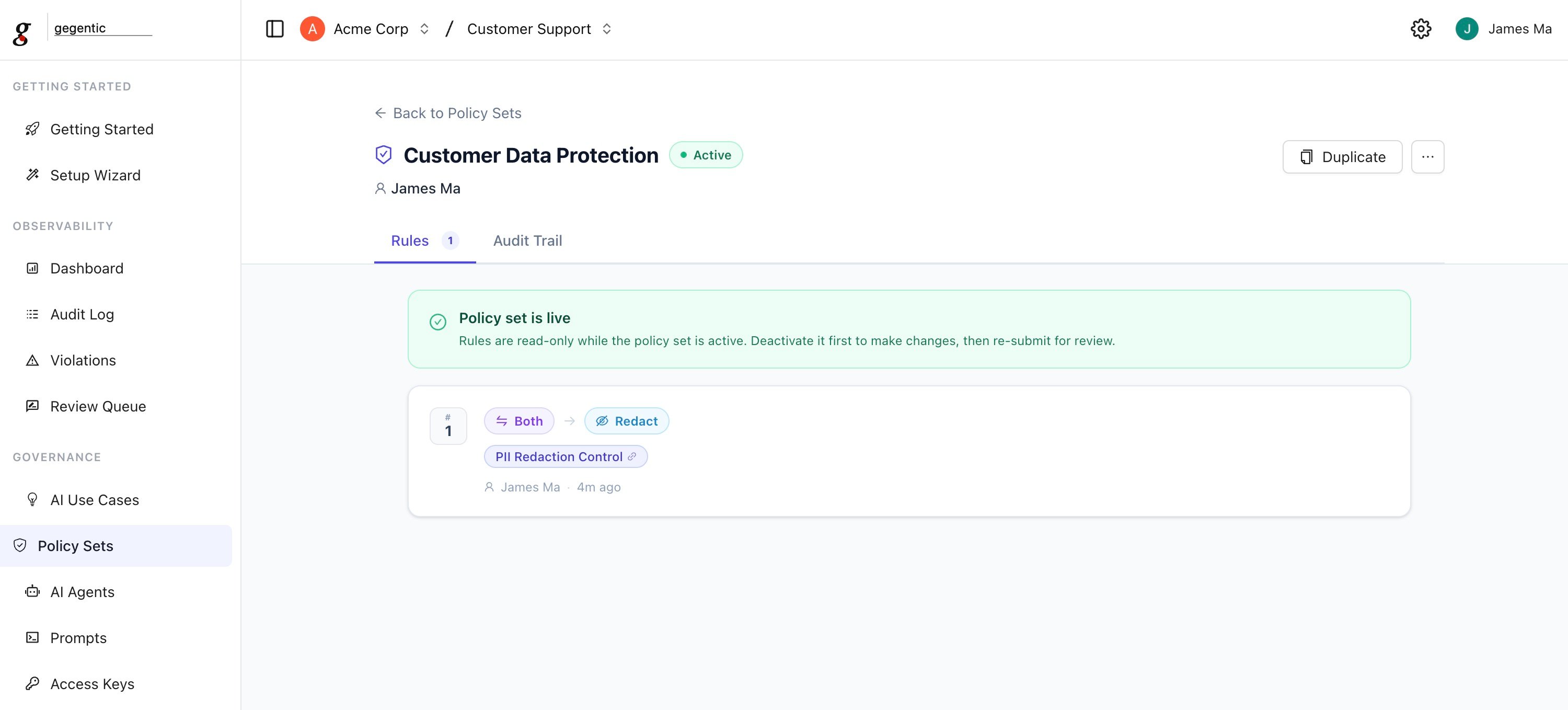
A [project](/projects) may contain multiple Policy Sets. Each Policy Set groups together a set of **Rules**, can be tagged to a regulation it helps satisfy, and goes through a review workflow before it takes effect.
 ## Creating a Policy Set
When creating a Policy Set, you can set:
* **Policy Set Name** (required, 3–128 characters)
* **Description** (optional) — what AI workflows it governs and what risks it addresses
* **Regulation** (optional) — tag it against a compliance framework: GDPR, HIPAA, SOC 2, ISO 27001, PCI DSS, CCPA, NIST AI RMF, EU AI Act, DORA, FedRAMP, PIPEDA, LGPD, MAS TRM, or APRA CPS 234
* **Owner** (optional) — the email or team responsible for the Policy Set
* **Data Classification** (optional)
* **Scheduled Review** (optional) — a date to revisit the Policy Set
## Rules
Each Policy Set contains one or more Rules. A Rule defines:
* **Controls** — one or more [Controls](/compliance/controls) the rule enforces
* **Scope** — whether it applies to `input`, `output`, or `both`
* **Action** — what happens on a match: `block`, `flag`, `redact`, or `human_review`
* **Ordering** — the sequence rules are evaluated in
`human_review` routes the request to the [Review Queue](/observability/review-queue) for a human decision instead of an automatic block or pass.
## Lifecycle
A Policy Set moves through these statuses:
```
Draft → Pending Review → Active ⇄ Inactive → Archived
```
* **Draft** — fully editable. Can be submitted for review or deleted.
* **Pending Review** — awaiting an approver. The creator can cancel the review (returns to Draft); an approver can approve (→ Active) or send it back with a reason (→ Draft).
* **Active** — enforced on live traffic. Can be deactivated (→ Inactive). Active Policy Sets cannot be deleted directly — deactivate first.
* **Inactive** — not enforced, but retained. Can be reactivated or archived.
* **Archived** — terminal state, cannot be reactivated. Kept for audit history.
Policy Sets can be duplicated from any status, which is useful for iterating on an Active set without affecting live enforcement until the copy is reviewed and activated.
## How enforcement works
Each [AI Agent](/governance/ai-agents) can be assigned a Policy Set. Every request that agent handles is evaluated against the Active Policy Set's Rules, in order, against the configured scope (input, output, or both).
If a Rule matches:
* `block` stops the request and returns an error
* `flag` lets the request through but records the match for review in the [Audit Log](/observability/audit-log)
* `redact` removes or masks the matched content before continuing
* `human_review` holds the request in the [Review Queue](/observability/review-queue) until a reviewer approves or rejects it
If you need help aligning your Policy Sets to meet strict latency requirements, reach out to [support@gegentic.com](mailto:support@gegentic.com).
## Creating a Policy Set
When creating a Policy Set, you can set:
* **Policy Set Name** (required, 3–128 characters)
* **Description** (optional) — what AI workflows it governs and what risks it addresses
* **Regulation** (optional) — tag it against a compliance framework: GDPR, HIPAA, SOC 2, ISO 27001, PCI DSS, CCPA, NIST AI RMF, EU AI Act, DORA, FedRAMP, PIPEDA, LGPD, MAS TRM, or APRA CPS 234
* **Owner** (optional) — the email or team responsible for the Policy Set
* **Data Classification** (optional)
* **Scheduled Review** (optional) — a date to revisit the Policy Set
## Rules
Each Policy Set contains one or more Rules. A Rule defines:
* **Controls** — one or more [Controls](/compliance/controls) the rule enforces
* **Scope** — whether it applies to `input`, `output`, or `both`
* **Action** — what happens on a match: `block`, `flag`, `redact`, or `human_review`
* **Ordering** — the sequence rules are evaluated in
`human_review` routes the request to the [Review Queue](/observability/review-queue) for a human decision instead of an automatic block or pass.
## Lifecycle
A Policy Set moves through these statuses:
```
Draft → Pending Review → Active ⇄ Inactive → Archived
```
* **Draft** — fully editable. Can be submitted for review or deleted.
* **Pending Review** — awaiting an approver. The creator can cancel the review (returns to Draft); an approver can approve (→ Active) or send it back with a reason (→ Draft).
* **Active** — enforced on live traffic. Can be deactivated (→ Inactive). Active Policy Sets cannot be deleted directly — deactivate first.
* **Inactive** — not enforced, but retained. Can be reactivated or archived.
* **Archived** — terminal state, cannot be reactivated. Kept for audit history.
Policy Sets can be duplicated from any status, which is useful for iterating on an Active set without affecting live enforcement until the copy is reviewed and activated.
## How enforcement works
Each [AI Agent](/governance/ai-agents) can be assigned a Policy Set. Every request that agent handles is evaluated against the Active Policy Set's Rules, in order, against the configured scope (input, output, or both).
If a Rule matches:
* `block` stops the request and returns an error
* `flag` lets the request through but records the match for review in the [Audit Log](/observability/audit-log)
* `redact` removes or masks the matched content before continuing
* `human_review` holds the request in the [Review Queue](/observability/review-queue) until a reviewer approves or rejects it
If you need help aligning your Policy Sets to meet strict latency requirements, reach out to [support@gegentic.com](mailto:support@gegentic.com).